 Freelance Cash Desk
Know who owes you, what you spent, and what to set aside for taxes.
Freelance Cash Desk is one Excel and Google Sheets workbook for US freelancers. It flags overdue invoices on its own, logs your expenses, shows your numbers on a dashboard with charts, keeps a quarterly tax set-aside organizer, and works out the lowest hourly rate you can afford to quote.
- Excel + Google Sheets
- No macros
- SAMPLE data included
- One-time $17
Sound familiar?
Freelance money admin isn't hard. It's scattered, and it keeps slipping down the to-do list.
"Did they ever pay that?"
Invoices live in email threads, so a late payment can go unnoticed for weeks.
The quarterly tax scramble
Estimated tax dates come around and you're not sure how much you should have saved.
Quoting by gut feel
You pick a rate that sounds reasonable without checking whether it covers overhead, taxes, and time off.
Expenses everywhere
Receipts are spread across cards, apps, and inboxes, so year-to-date spending is a guess.
What's inside
One .xlsx workbook with eight sheets, plus a How-to-Use guide and a README. SAMPLE rows come pre-filled so you can see how everything works before you add your own data.
Setup
Your name, business year, currency label, and the tax set-aside percentage the other sheets use.
Dashboard
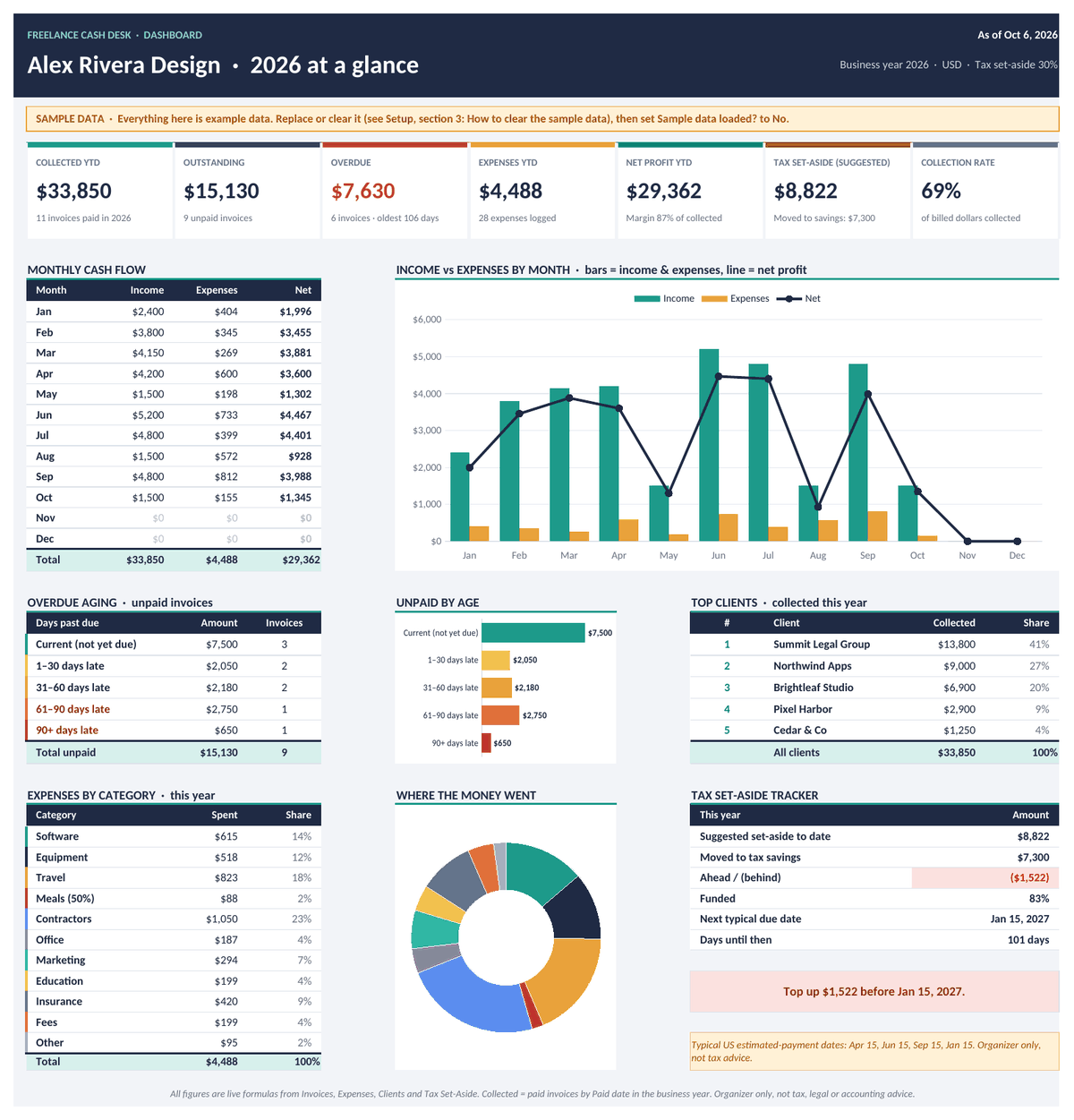
Collected year to date, outstanding, overdue count and amount, expenses, suggested set-aside, and collection rate, plus charts and overdue aging.
Invoices
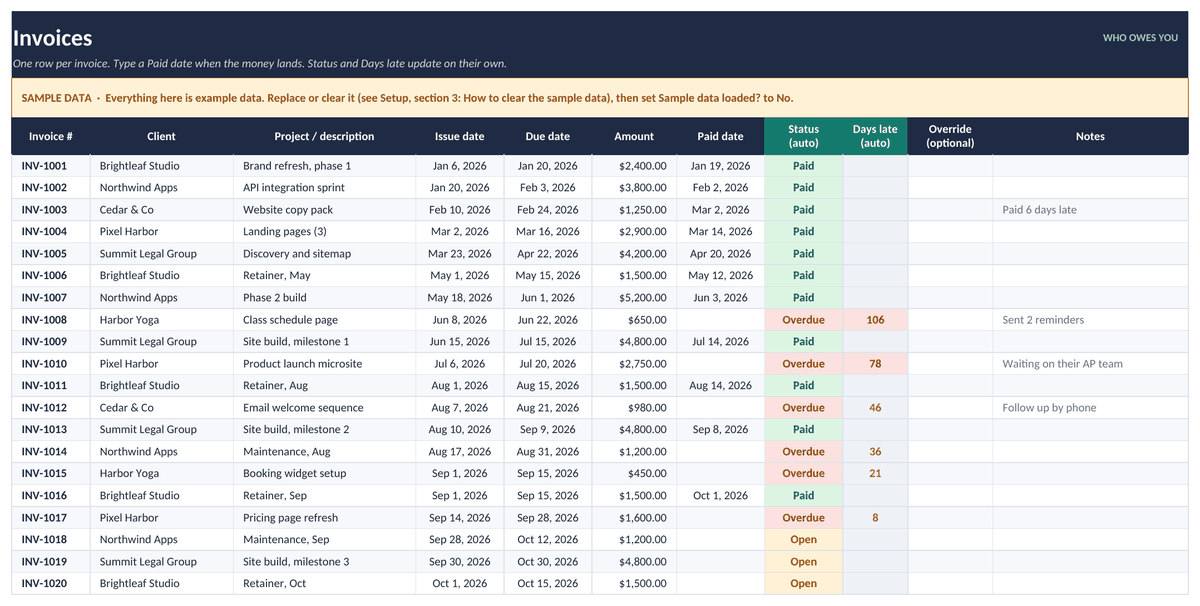
Your invoice log. Status changes to Overdue on its own once the due date passes and no paid date has been entered.
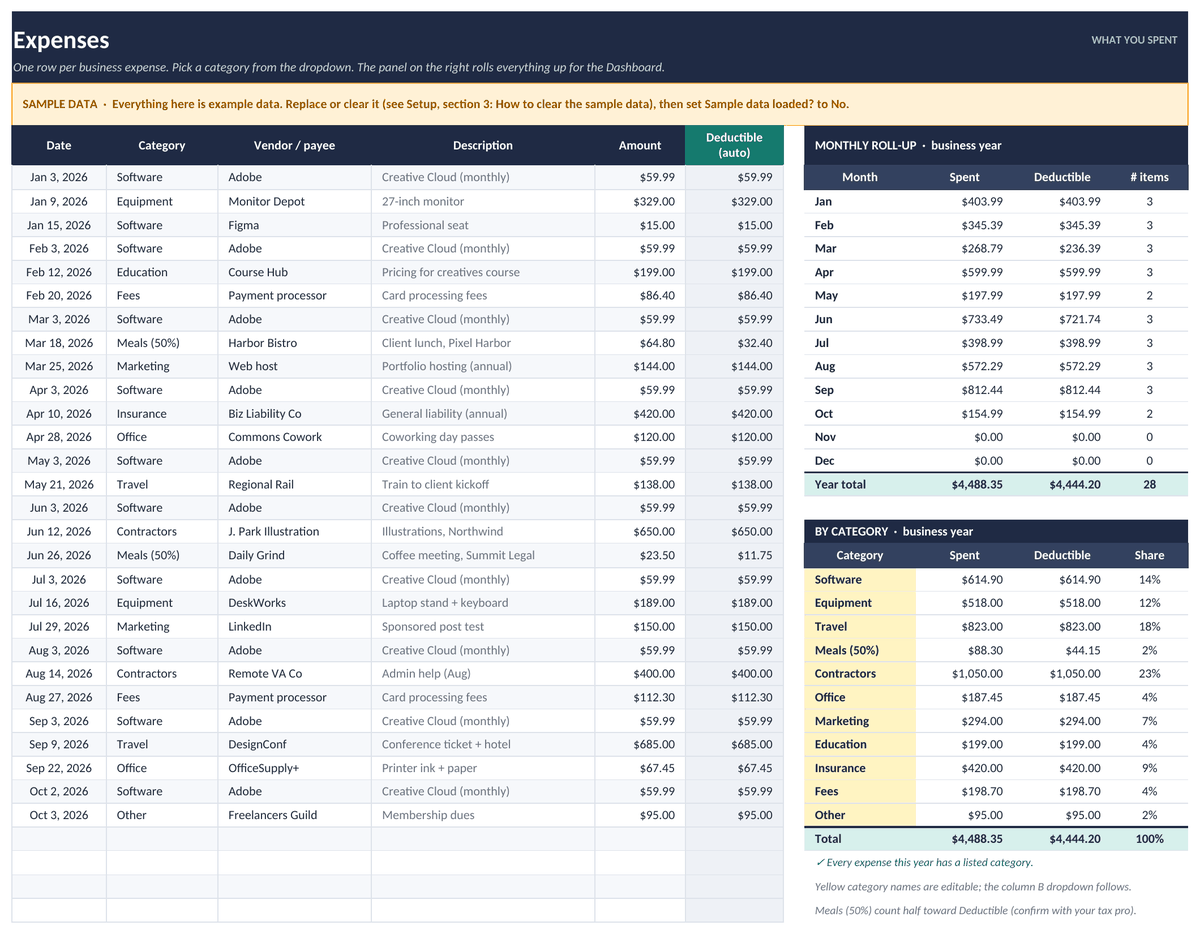
Expenses
A dated, categorized expense log with suggested categories in a dropdown. You can also type your own.
Tax Set-Aside
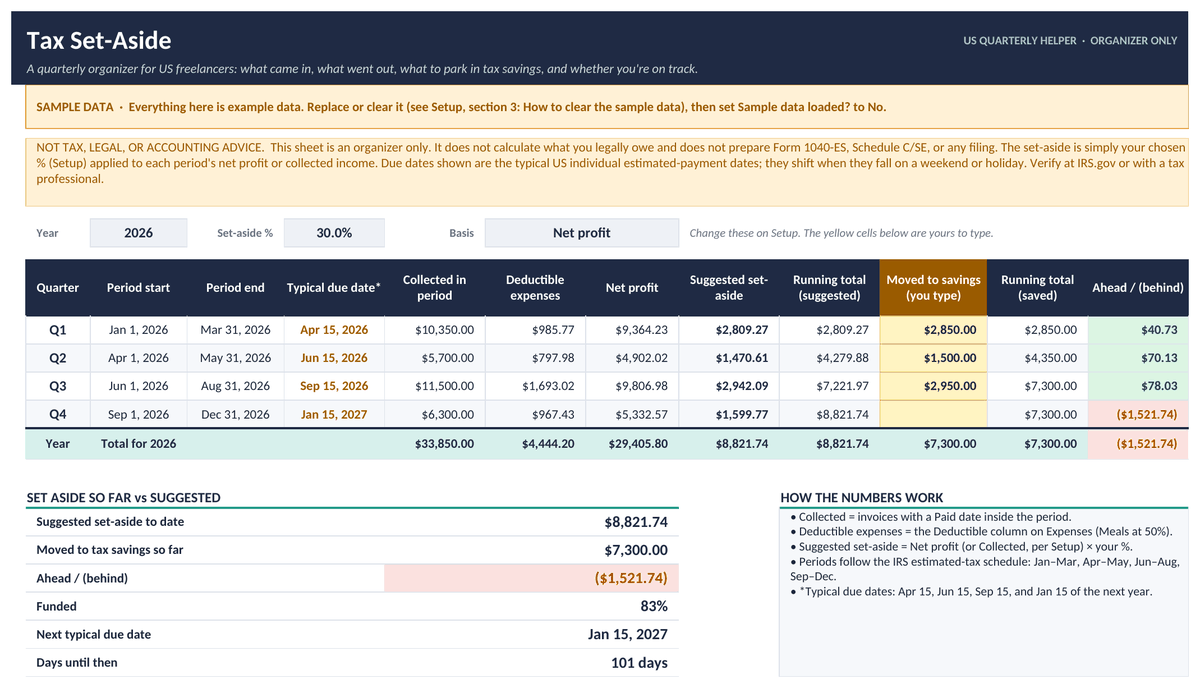
A US quarterly organizer: income collected, expenses, and a suggested set-aside for Q1 to Q4. It's an organizer, not tax advice.
Rate Floor
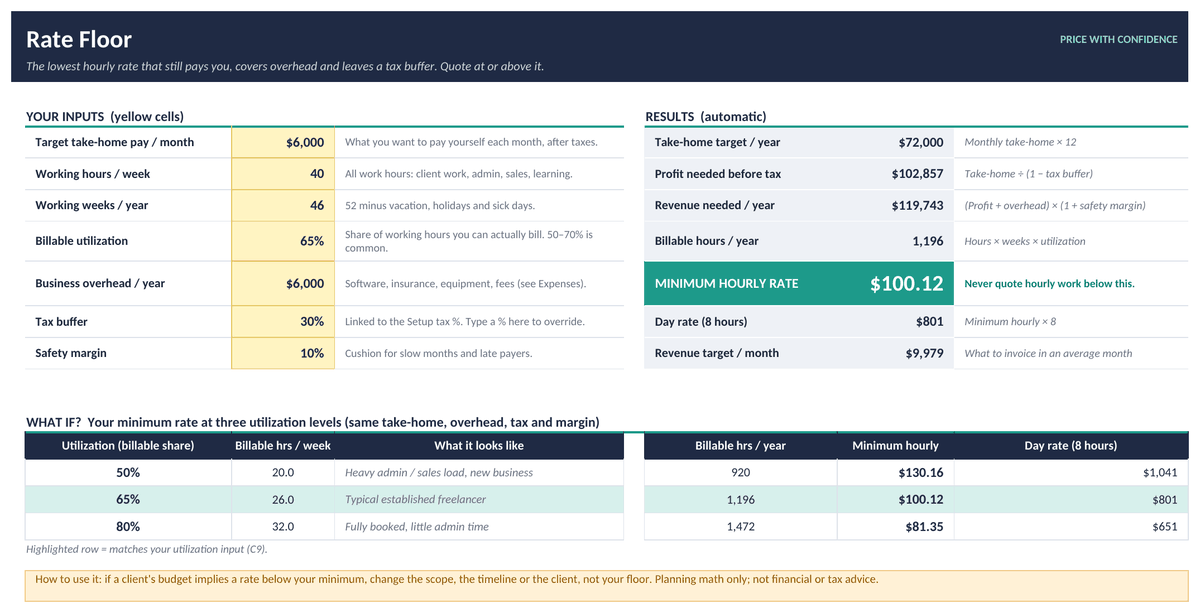
Enter your take-home goal, billable hours, weeks worked, overhead, and tax buffer, and it calculates your minimum hourly rate.
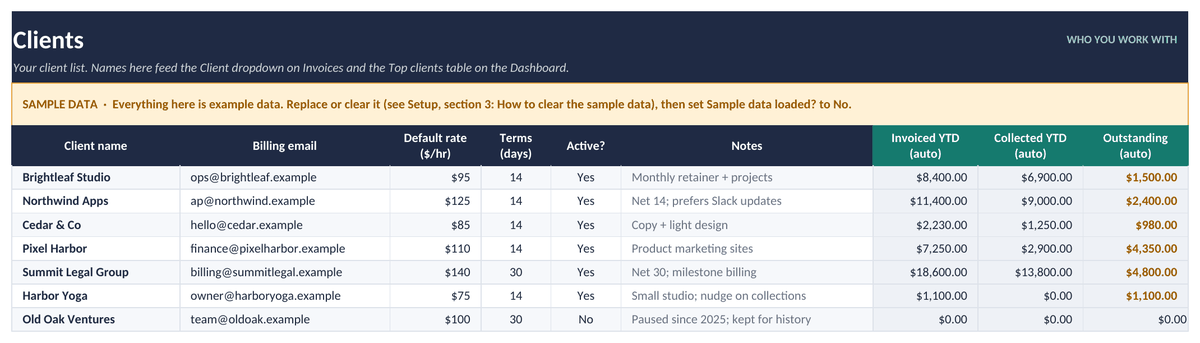
Clients
A simple client list with contact details, a default-rate reminder, and an active flag.
How-to
A short start guide inside the workbook, so you won't need to dig out the instructions later.
See the actual workbook
These are renders of the real file with its SAMPLE data, made in LibreOffice. Fonts and colors look slightly different in Excel and Google Sheets. Tap any image to see it full size.
Is it a good fit?
Good fit for
- Solo freelancers, consultants, designers, writers, developers, and VAs in the US
- Anyone who wants a single place to track collections, spending, and tax savings
- People who'd rather work in a spreadsheet than learn an accounting app
- Anyone who wants to check a rate before quoting it
Not a fit for
- Teams that need multi-user accounting software
- Anyone who wants bookkeeping done for them, bank sync, or IRS e-filing
- Anyone looking for tax, legal, or accounting advice. This is an organizer only.
- Businesses that need payroll, inventory, or sales-tax tracking
FAQ
Does it work in Excel or Google Sheets?
It works in both. It's a standard .xlsx file built on common formulas like SUMIF, COUNTIF, and TODAY, with no VBA. In Excel, just open the file. For Google Sheets, upload it to Google Drive and choose Open with Google Sheets.
Is this tax advice?
No. Freelance Cash Desk is an organizer and planning tool only. It isn't tax, legal, or accounting advice, it isn't an IRS form, and it doesn't prepare or file anything. Set-aside percentages and quarterly due-date notes are general guides. Check your real figures and dates on IRS.gov or with a qualified tax professional.
Will it file my taxes?
No. It tracks the income you've collected and suggests a set-aside amount based on the percentage you choose. You or your tax professional still handle the filings and payments.
Can I use it outside the US?
The invoice, expense, dashboard, client, and rate sheets work anywhere. The quarterly labels follow the US estimated-tax schedule, so outside the US, treat that sheet as a general savings organizer.
Are there macros?
No. There are no macros, scripts, or add-ons, so it opens fine on locked-down work computers and in Google Sheets.
How do I get the file?
After you pay, Stripe takes you to a download page. The link is also on your Stripe receipt, so you can download the file again later.
What's your refund policy?
If the file won't open or is defective, contact us within 14 days of purchase and we'll refund you. Because it's an instant digital download, we don't offer refunds for change of mind. See the refund policy.
What can I do with it under the license?
It's licensed for personal use by one freelancer or sole proprietor. You can edit it for your own business, but you can't resell, share, or redistribute the template files. See the terms.
Get your freelance money organized
Eight sheets, SAMPLE data to learn from, works in Excel and Google Sheets.
Freelance Cash Desk is an organizer and planning tool. It isn't tax, legal, or accounting advice. Talk to a qualified professional about your specific situation.